ManyVids review: fees, features and who it's best for
 By Jessica Sanders · Published August 11, 2022 · Updated September 11, 2026
ManyVids is a video marketplace first: shoppers browse categories, trailers and individual videos they can buy one at a time. This review covers how much creators keep on different sale types, Club versus Memberships, weekly payouts and who the site suits.
If that matches how you want to sell: Join ManyVids
Features and fees below were checked against ManyVids’ official help pages listed in the sources. Short hub overview: OnlyFans alternatives. For monthly-subscription homes, see Fansly or LoyalFans.
Who it suits
ManyVids fits well if you already think in titles, trailers and a video library: fetish or niche clips, clear thumbnails, and buyers who arrive ready to purchase a specific video. On-site search and creator browse pages can bring shoppers you did not send yourself—useful when your niche is searchable, not a promise of traffic.
Club (ManyVids’ monthly subscription feed) keeps 80% for you—the same headline share as customs, tips and store items. Use Club when you want recurring income on ManyVids; price standard store videos knowing you keep 60% of those sales.
It is a weaker fit when you dislike keeping a shop-style page up to date, or when you only want a simple monthly feed and will never sell individual clips. You do not need customs, lives, contests or a full merch store to make individual video sales useful—those extras are optional.
How the product works
Creators (ManyVids often calls them MV Stars) set up a profile, upload videos, and choose which ways to earn. Beyond individual clips you can run a paid Club, a separate Membership product, customs, tips, chat, lives and a store—the sections below spell out how those differ. The site has been around since 2014 (Canada-based), so selling videos one at a time on a browseable marketplace predates the OnlyFans boom. Adult content dominates what shoppers see; the platform also markets itself to non-adult creators, but expect adult-leaning results even in lifestyle-adjacent categories.
Illegal content is prohibited. When other people appear in your vids or lives, ManyVids documents co-performer release and ID record-keeping requirements (Co-performer Documentation). Read the live uploader terms for your format before you migrate a whole catalog.
Selling individual videos
The core loop: upload a video, set a one-off price, and sell access to that clip. Official pricing policy sets NSFW (not safe for work / adult) vids at a $1.99 minimum (as of the October 2, 2025 free-NSFW change note) up to $999.99, with SFW (safe for work / non-adult) free listings still allowed (Pricing Policy). Free or low-priced SFW teasers still help shoppers decide whether your paid videos are worth opening—without using NSFW free listings that the policy now prices.
Member terms describe purchased digital content as viewable in the buyer’s purchase history after payment is confirmed, and note that downloaded content is available once payment clears (Terms for Users & Members). That is not the same as promising offline ownership forever if an account or upload later becomes unavailable—terms also warn that banned-uploader content can stop being accessible.
This is where ManyVids differs most from a site built mainly around a monthly subscription. A buyer can find you through search, buy one niche video, and leave—or stick around for Club, Membership or customs. Titles, tags, trailers and thumbnails do the selling work that a private Instagram-style feed does elsewhere.
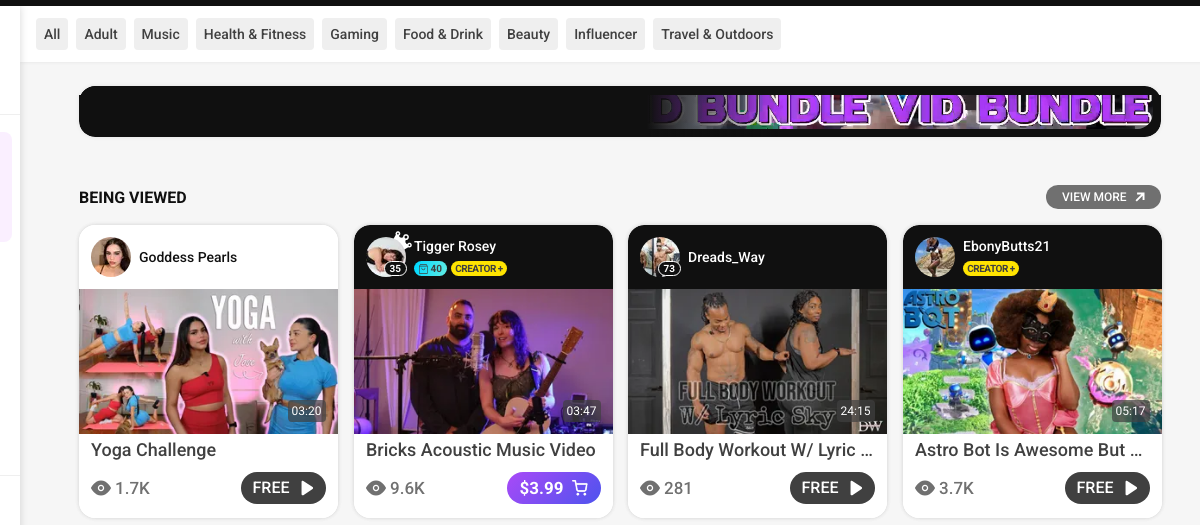
Shoppers browse categories and open individual videos. Free previews and priced store clips sit in the same grid—this is the marketplace loop, not a private monthly feed.
- Category filters for browsing niches
- Priced store clip ($3.99) vs Free play buttons
Club vs Memberships (similar names, different jobs)
These two recurring products get confused. Official docs treat them as separate price bands; Club has a dedicated setup guide, while public help says less about what a Membership includes.
Club (VIP FanClub / Club for Subs). ManyVids describes Club as a private subscription that lets you send exclusive pics, vids and notes to paying subscribers (Club for Subs). Monthly Club plans sit between $1.99 and $29.99 (Pricing Policy). Profiles can show how many Club vids, pics and notes are included. Official Club help states subscribers keep access as long as they continue to pay, with automatic billing; price edits do not change what an already-renewing subscriber pays for their ongoing plan. Optional Club trials give 24 hours of Club access before rolling into a one-month plan when you offer one.
Club content is what you put in the Club feed—not automatically every clip in your store. Decide, upload by upload, what is a store vid versus a Club post.
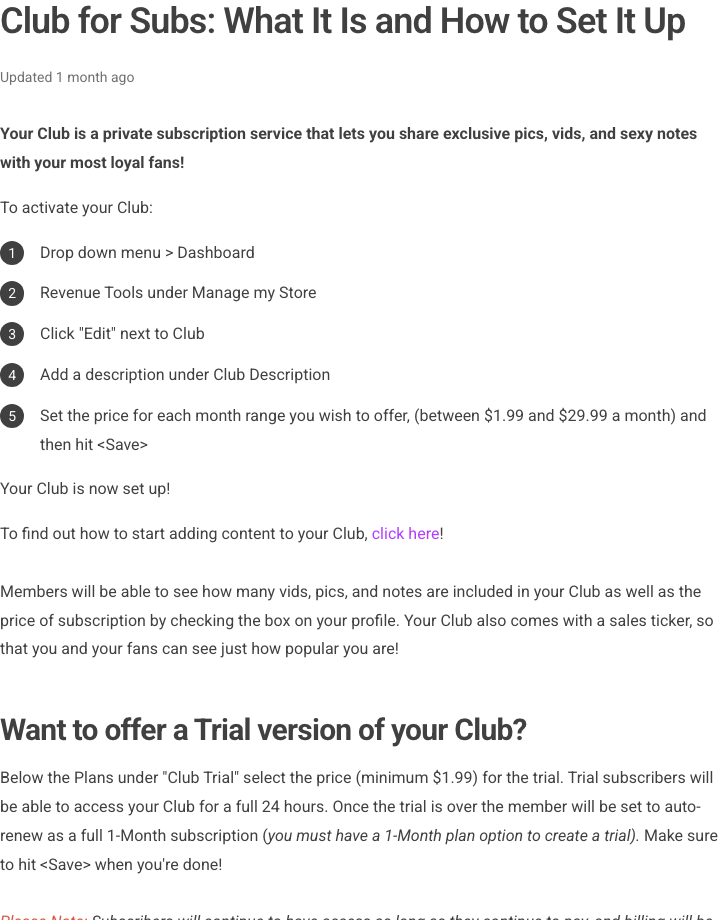
Official Club help: set it up under Revenue Tools, price the monthly plan between $1.99 and $29.99, and post exclusive Club pics, vids and notes. Store videos stay separately purchasable unless you put them in Club.
- Club is a private subscription feed
- Monthly price band $1.99–$29.99 in creator tools
Memberships. Pricing policy lists Memberships as a separate product from Club, priced $39.99–$999.99 (Pricing Policy). Member terms say a membership granted by an uploader terminates when it expires, and related content is removed then (Terms for Users & Members). Public pricing and member terms do not spell out catalog inclusion, billing-period options or commission for Memberships—confirm those in live creator tools before you sell one. Until then, treat Membership as a separate priced product, not “Club with a bigger number.”
Individual clip
- One-off purchase of that title
- View via purchase history after payment
- Price band $1.99–$999.99 (NSFW minimum $1.99)
Club
- Subscription feed of Club pics, vids and notes
- Access while the subscriber keeps paying
- Monthly price band $1.99–$29.99
Illustrative packaging (assumptions only)
Suppose you sell soft-fetish solo clips:
- Individual clip: “Office heels POV, 8 minutes” at $14—buyer pays once for that title (then sees it via purchase history per member terms).
- Club: $9.99/month—buyer gets the Club feed you post for subscribers (teasers, short extras, notes), not a substitute for every $14 store title unless you deliberately put those titles in Club.
A buyer who only wants one POV buys the clip. Someone who mainly wants ongoing posts may take Club. Clear labels reduce “I paid for Club—why isn’t this store clip included?” messages.
Customs, tips, chat, lives and store
Optional add-ons sit beside individual video sales:
- Custom videos — request-based shoots at prices you set (policy cap $9,999); decline or refund requests you will not film. Customs usually need extra shoot and edit time beyond uploading a finished store clip—price and delivery windows should reflect that.
- Tips and fundraising — support without a new store listing; fundraisers can attach a stated reward if you want one.
- Contest votes — Members can give limited free votes or paid votes in ManyVids contests. Uploaders terms state paid votes generate earnings whether or not you win; votes do not grant content access; anything you offer in exchange for votes is treated as a gratuity, not a content sale (Terms for Uploaders). On the commission table, that paid-vote revenue keeps 60%.
- Paid inbox / chat and video chat — message and call pricing you control; on the official commission table, pay-to-open inbox sales keep 60% for the creator.
- Live shows — token tipping; tokens have their own payout rate on the commission article.
- Store items — physical or digital products beyond the video library.
None of these are required. A clear set of individual videos plus clear Club posts is a complete ManyVids business if that matches your energy.
Discovery and getting oriented
ManyVids leans on marketplace discovery: category browsing, search filters and creator directories. Accurate niches, honest trailers and a matching profile help once someone lands on your page. Promoting from social media still helps most niches—discovery tools do not guarantee sales.
The first login can feel busy. Work through setup for the few tools you will actually use, then ignore the rest until you need them.
Fees and payouts
Available payout methods can vary by country. The table later in this section is what ManyVids documents for Direct Deposit, Paxum and Cosmopayment.
Creator share by product
ManyVids does not charge the same platform fee on every sale type. Official Creator Commission Payout Percentages (percentages can change—recheck the live article):
80%
Club, customs, tips & store
Creator payout on those product sales.
60%
Vids, bundles & paid votes
Also covers pay-to-open inbox.
$50
Payout minimum
Direct Deposit, Paxum and Cosmopayment.
ManyVids Creator Commission Payout Percentages — Tokens use a separate $0.08 per token live rate on that article. Membership commission is not listed there.
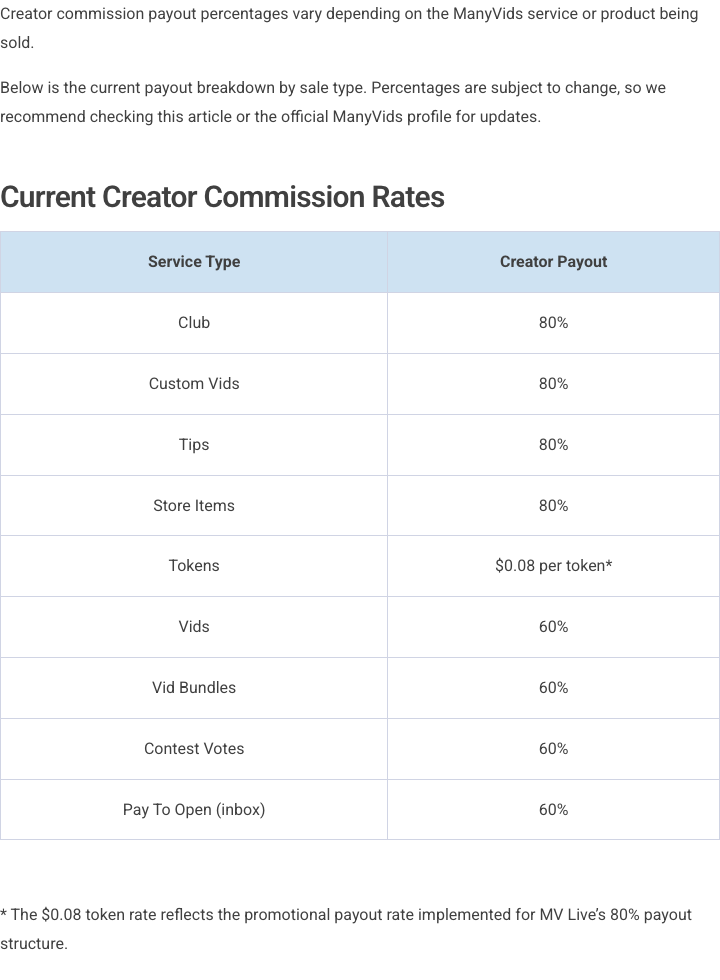
ManyVids’ published commission table: Club, customs, tips and store items keep 80%; standard vids, bundles, contest votes and pay-to-open inbox keep 60%. Membership is not listed.
- 80% creator payout on Club, customs, tips and store
- 60% creator payout on standard vids and related sales
So a $20 Club month is about $16 to you before payout-method fees—similar headline math to OnlyFans’ usual 20% platform fee (OnlyFans Terms). A $15 standard video is about $9 to you before method fees. Price store clips for the 60% keep-rate; use Club, customs and store items when you want sale types that keep 80%.
Memberships appear in Pricing Policy, but the published commission table has no Memberships row—confirm that line in-account before you budget Membership income.
Weekly payouts: period, arrears, issuance and receipt
Official help separates when earnings accrue, when ManyVids issues a payout, and when the payout method finishes delivering the money (Weekly Payouts; Payout Information):
- Earnings periodWed 12:00 AM–Tue 11:59 PM UTC
- 7 days in arrearsHeld about a week after that earnings week
- Issued WednesdayWhen your method minimum is met
- Method receiptThen 3–5 business days by method (see table)
“Seven days in arrears” is not the same as “cash in hand seven days after a sale.”
Documented methods, minima, transfer fees and processing times after issuance (Payout Information):
| Method | Minimum | Transfer fee | Processing after issuance |
|---|---|---|---|
| Direct Deposit | $50 | $2.00 US / $5.50 intl | 5 business days |
| Paxum prepaid cards | $50 | $1.00 | 3 business days |
| Cosmopayment prepaid cards | $50 | Fees applied by Cosmopayment | 3 business days |
Country support for Direct Deposit is limited to the countries ManyVids lists on that page. After platform commissions, method fees still come out of what you receive—and that remaining amount still has to cover production expenses and taxes.
Illustrative earnings mix
Example: $170 gross mix
Example
$60 in standard vids (60%) + $30 Club (80%) + $80 custom (80%) → $170 gross → $124 after commissions (72.9% creator share), before payout-method fees, expenses and tax.
- Gross sales
- $170
- Platform commission
- $46
- Remaining after commissions
- $124 (72.9%)
Before payout-method fees, production expenses and taxes. Rates from ManyVids Creator Commission Payout Percentages. Membership sales are not included—that commission line is unconfirmed on the published table.
Adjust sales amounts
If almost all revenue is standard videos, budget as if you keep 60% of those sales—Club and customs in the default mix raise how much you keep overall because those sale types keep 80%. The custom also needs its own shoot and edit time. Price customs so the amount after ManyVids’ commission still covers that extra work, plus the expenses and taxes that sit outside platform commission.
Verdict: who benefits from this video shop?
| Question | Assessment |
|---|---|
| Can individual video sales carry meaningful income? | Yes, when you sell niche or themed videos buyers can find and purchase one at a time. |
| Same business as OnlyFans? | No. ManyVids is built around buying individual videos first; Club is an optional monthly feed on the same site. For a pure monthly subscription platform, see OnlyFans alternatives. |
| Fee competitiveness | By sale type: you keep 80% of Club, customs, tips and store · 60% of standard videos, bundles, contest votes and pay-to-open inbox. Membership commission is not on that table. |
| Payout basics | Weekly Wednesday payouts after about seven days’ hold, then method minimums, fees and processing times. |
| Must use every monetization tool? | No. Unused lives, contests or store listings are optional. |
Bottom line: Choose ManyVids when you will run a video shop—clear niches, trailers and store prices that still work after you keep 60% of standard video sales. Add Club when you also want a monthly feed that keeps 80%. It is a weaker pick as your only platform if you only want a simple monthly subscription and will not sell clips. Many creators pair ManyVids for individual videos with a monthly page elsewhere.
Follower may earn a commission if you sign up through this link.
Sources and references
- ManyVids - Creator Commission Payout Percentages
- ManyVids - Weekly Payouts
- ManyVids - Payout Information
- ManyVids - Club for Subs: What It Is and How to Set It Up
- ManyVids - Pricing Policy
- ManyVids - Terms for Users & Members
- ManyVids - Terms for Uploaders
- ManyVids - Co-performer Documentation
- OnlyFans Terms of Service